
For many UK small businesses, Canva Pro is worth paying for when Canva is used every week for social media, marketing, product images, presentations or other branded content. Canva currently lists Pro at £100 per year for one person in the UK. The strongest reasons to upgrade are usually the repeated tasks it removes: maintaining brand consistency, finding premium assets, removing backgrounds, resizing campaigns and scheduling social content.
If you only open Canva occasionally and Free already covers your workflow, paying for Pro is much harder to justify. The useful question is not “Does Pro have more features?” but “Will these features save my business at least £100 of time or external costs over a year?”
Canva can change prices, feature limits and plan names. Check the current UK pricing page before purchasing.
What do small businesses actually use Canva for?
Canva can cover a surprisingly wide part of a small business's everyday content workflow without requiring traditional professional design software. Typical uses include social posts, Stories, product graphics, flyers, menus, presentations, proposals, website graphics, email banners, posters and simple advertising creative.
The value of Pro therefore depends heavily on frequency. A local café publishing every day, an ecommerce seller preparing product images every week, or a consultant building recurring presentations will encounter Canva's workflow repeatedly. A tradesperson who creates one leaflet every few months may not.
That is why a useful upgrade decision starts with the content you actually produce — not with a list of every feature Canva offers.
Canva Free vs Pro vs Business for a UK small business
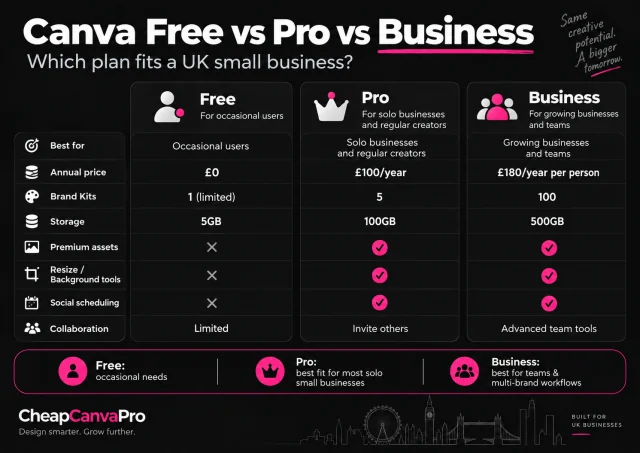
Canva's current UK plan structure makes one distinction especially important: Pro is primarily positioned for an individual creator, while Business adds stronger brand, approval and team capabilities. A business does not need Canva Business merely because it uses Canva commercially.
| Feature | Canva Free | Canva Pro | Canva Business |
|---|---|---|---|
| UK annual price | £0 | £100/year | £180/year per person |
| Typical fit | Occasional users | Solo businesses and regular creators | Growing businesses and small teams |
| Brand Kits | 1 limited kit | 5 | 100 + approval features |
| Cloud storage | 5GB | 100GB | 500GB |
| Templates | 1.6M+ | 3.6M+ | 3.6M+ |
| Premium media | Free library | 141M+ premium assets | 141M+ premium assets |
| Background removal / advanced design tools | Limited | Included | Included |
| Social scheduling | — | Included | Included |
| AI allowance | Base allowance | Higher allowance | Higher again |
| Collaboration / admin | Basic collaboration | Individual-focused | Advanced team tools |
For the wider feature-by-feature comparison, see our Canva Free vs Pro UK guide. For official cost context, see the Canva Pro Price UK guide.
Is Canva Pro worth £100 a year?
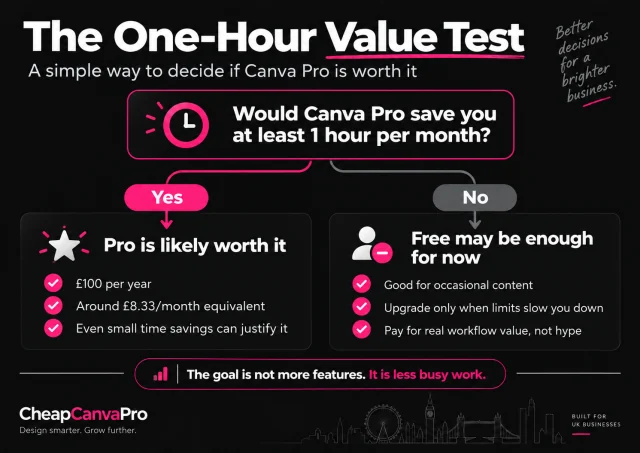
The cleanest way to evaluate the current £100 annual price is to compare it with the value of time saved. £100 divided across twelve months is approximately £8.33 per month equivalent. That is a calculation, not a claim that Canva bills £8.33 monthly.
If your working time is worth £25 per hour, Canva Pro needs to save roughly four hours over an entire year to equal £100 of time value. That is around twenty minutes per month.
For a business repeatedly removing backgrounds, adapting one campaign to several sizes, searching for usable assets, applying brand settings and preparing social content, twenty minutes of monthly savings is plausible. For an occasional user, it may not be.
Brand Kit: useful because it removes repeated decisions
Brand consistency becomes harder as a business produces more content. You may have a logo, several logo variants, brand colours, heading fonts, body fonts and recurring templates. Re-entering or searching for those elements is small work, but it repeats.
Canva Free now includes a limited Brand Kit rather than having no brand functionality at all. Canva Pro expands the workflow to five Brand Kits, which makes the old claim that “Brand Kit is Pro-only” inaccurate.
The practical benefit is not simply storing colours. It is reducing the number of choices and manual steps needed to keep everyday content consistent.
Example: a local restaurant
A restaurant might create weekly menus, Instagram posts, Stories, delivery promotions, event flyers and holiday opening notices. If all of them need the same logo, colours and typography, a repeatable brand setup can save time while reducing visual inconsistency.
If your business creates only one or two simple graphics every few months, manually applying the same settings may not be inconvenient enough to justify upgrading.
Do premium templates and stock assets justify Pro?
Canva Free already contains a large template and media library. Pro expands the available templates and gives access to Canva's much larger premium media collection.
The business value is not the headline number of assets. The useful measure is how much sourcing time the integrated library removes. If you frequently search for stock photography, icons, promotional video, presentation layouts or campaign templates, an expanded library may shorten production. If Free consistently gives you suitable material, this feature has much less incremental value.
Background Remover and resizing: small features with recurring value
Some of Pro's most practical business features are valuable precisely because they are boring: they eliminate repeated production work.
Background Remover
Background removal is useful for businesses working with products, people or promotional photography. Ecommerce sellers, restaurants, beauty businesses, clothing shops, property businesses and automotive sellers can all need clean cut-outs for ads or social graphics.
Doing that inside the same design workflow can remove the need to export the image, open another tool, process it and return to Canva.
Resize and Magic Switch
A single campaign can require a square social post, Story, Facebook creative, LinkedIn graphic, advertisement and flyer. Rebuilding every format manually is repetitive. Canva's resizing tools are most valuable when you repeatedly adapt the same campaign across several destinations.
If your business only publishes in one format, the feature naturally matters less.
Canva's social scheduling can simplify the workflow
Canva Pro includes Content Planner functionality for supported social channels. The advantage is workflow consolidation: instead of designing, downloading, opening a second scheduling service and uploading again, more of the process can remain inside Canva.
This matters more to a business publishing twenty pieces of content every month than to one publishing twice. Like most Pro features, its value rises with repetition.
The one-hour value test
Use this simple test before paying:
Would Canva Pro save your business at least one useful hour during a normal month?
If the answer is clearly yes, £100 per year is relatively easy to justify for many businesses. In fact, depending on the value of your time, substantially less than one saved hour per month may already cover the subscription.
| Your workflow | What it suggests |
|---|---|
| Canva used several times every week | Pro deserves serious consideration |
| One campaign adapted to many channels | Resize tools become more valuable |
| Frequent product-image editing | Background removal can save recurring time |
| Repeated branded content | Brand Kit becomes more useful |
| Frequent stock-image or template searches | Premium library may reduce sourcing time |
| Canva used only a few times per year | Free is probably sufficient |
| Several staff need approvals or administration | Compare Business rather than automatically choosing Pro |
A practical monthly small-business example
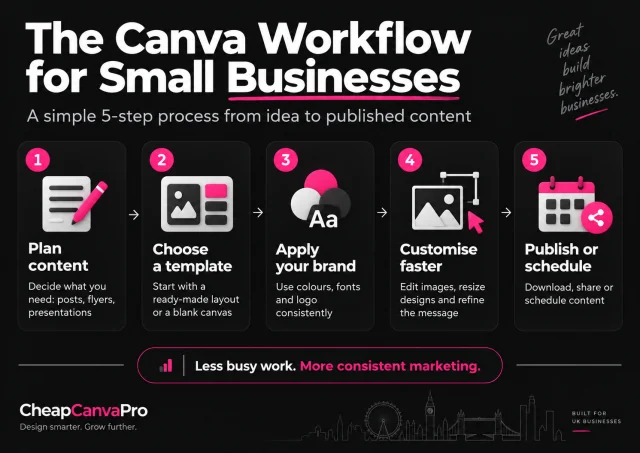
Imagine an independent UK skincare shop producing twelve Instagram posts, eight Stories, four product promotions, two email banners, one flyer and one presentation in a month, plus several product photographs that need clean backgrounds.
With Canva Free
The owner can still create a large amount of this content. Canva Free is capable. But the workflow may involve more manual brand setup, searching for free alternatives to premium assets, using a separate image tool, recreating sizes and exporting content before scheduling elsewhere.
With Canva Pro
The same business can potentially use Brand Kit for recurring brand settings, Background Remover for product photography, premium assets for campaigns, resizing tools for format variations and Content Planner for social publishing.
Pro does not automatically make the marketing better. Its potential value is reducing the number of repetitive steps between an idea and finished content.
Solo business vs small team: Pro or Business?
For a solo owner, sole trader or individual marketer, Pro will often be the more relevant paid comparison because the main benefits are premium assets, brand tools and workflow shortcuts.
Canva Business becomes more relevant when the workflow itself changes: several people need to collaborate, the company manages many brands, approval steps matter, storage requirements increase, or stronger administration is needed.
A small company therefore should not upgrade to Business simply because it is a business. Choose the plan based on how the work is organised.
When Canva Pro is probably not worth it
You rarely create content
If you use Canva a few times per year, Free may cover most of what you need.
Your designs are extremely simple
Basic posts consisting of a logo, photograph and text may not require premium tools.
You already pay for alternatives
If another tool already gives you stock photography, background removal, scheduling, resizing or brand management, Pro may duplicate costs rather than eliminate them.
You outsource the design work
If a freelancer or agency produces all your marketing assets, the internal workflow benefits may be small.
You are upgrading for one impressive feature you rarely use
A feature can be technically impressive without creating £100 of business value. Upgrade based on recurring work, not novelty.
Commercial use and licensing: one point businesses should understand
Using Canva for business does not mean every Canva asset becomes unrestricted. Canva's Content License Agreement permits many commercial and promotional uses of finished designs, but restrictions still apply to Canva content. In particular, Pro content should not simply be downloaded and redistributed as a standalone asset.
Businesses selling templates, digital assets, merchandise or designs intended for resale should check the licence rules for their exact use case rather than assuming a Pro subscription removes every restriction.
How to decide in five minutes
- Look at your last month of content. Count what you actually created in Canva.
- List the repeated friction. Note resizing, background removal, asset searching, branding setup and scheduling.
- Estimate the time. How many minutes did those workarounds consume?
- Compare that with £100 per year. Use the value of your own working time, not a generic rule.
- Check whether you need Pro or Business. Solo workflow usually points toward Pro; approvals and stronger team administration can point toward Business.
If you are also deciding how long to pay for access, compare the trade-offs in our Canva Pro monthly vs annual UK guide. For the feature-specific view, see the Canva Pro features worth paying for.
Frequently asked questions
It can be when the business uses Canva regularly. The clearest value usually comes from reducing recurring work such as resizing, background removal, asset searching, brand setup and social scheduling. Occasional users may be better staying on Free.
Canva's UK pricing page lists Canva Pro at £100 per year for one person. Pricing can change, so check Canva directly before purchasing.
Yes for many simple or occasional workflows. A business does not need Pro merely because it uses Canva commercially. Upgrade when Free-plan limitations repeatedly cost time or require other paid tools.
Canva allows many commercial and promotional uses of finished designs containing eligible Canva content, but its licence restrictions still apply. Businesses reselling templates, assets or merchandise should check the current Content License Agreement for their exact use case.
Yes. Canva's current UK comparison lists five Brand Kits with Pro. Free also has a limited Brand Kit, so Brand Kit is no longer accurate to describe as entirely Pro-only.
It can be particularly useful for businesses that publish frequently because Pro combines templates, premium assets, resizing and social scheduling in one workflow.
It depends on how the team works. Pro is primarily individual-focused. Business becomes more relevant when stronger collaboration, approvals, administration, additional Brand Kits or larger storage matter.
No. Pro supplies more assets and faster tools, but layout, typography, branding, messaging and creative judgement still determine design quality.
Only if AI is already a meaningful part of your workflow. Canva provides some AI access on Free and higher allowances on paid plans, so the value depends on how often the tools genuinely save time.
Review your last month of Canva work. If you repeatedly had to remove backgrounds elsewhere, rebuild another size, search around premium assets, re-enter brand settings or move content to another scheduling tool, calculate how much time those interruptions consumed.
Conclusion
For a UK small business creating branded content every week, Canva Pro can make financial sense when it removes enough recurring work. The strongest reasons are usually practical: faster image preparation, easier resizing, better brand consistency, quicker access to usable assets and a simpler publishing workflow.
Businesses that use Canva only occasionally should avoid upgrading simply because Pro has more features. Start with Free, identify the real bottlenecks and pay only when those bottlenecks begin costing more than the subscription itself.
Choose the term that fits your workflow
Compare the current fixed-term options after deciding whether Canva Pro actually makes sense for your business.