
Canva currently lists Canva Pro at £100 per year for one person in the UK. That works out at about £8.33 per month across a year. Monthly billing is also available; current UK guides report around £13/month, so always check Canva's live checkout for the latest monthly figure.
The useful comparison is not just £100 versus a lower headline price. It is how long you need Pro, whether you want direct Canva billing, and which paid features you will actually use. The sections below separate those questions so you can compare the options without treating different purchase arrangements as identical.
Canva Pro UK pricing at a glance
| Option | Current price | Monthly equivalent | Best fit |
|---|---|---|---|
| Canva Free | £0 | £0 | Occasional design work |
| Canva Pro — annual | £100/year | ~£8.33/month | Regular solo Canva users |
| Canva Pro — monthly | £13/month* | £13/month | People who want direct month-to-month flexibility |
| Canva Business — annual | £180/year per person | £15/month equivalent | Teams that need business controls |
| CheapCanvaPro — 3 months | £9 | £3/month | Short projects |
| CheapCanvaPro — 6 months | £15 | £2.50/month | Medium-term use |
| CheapCanvaPro — 12 months | £19 | ~£1.58/month | Regular year-round use |
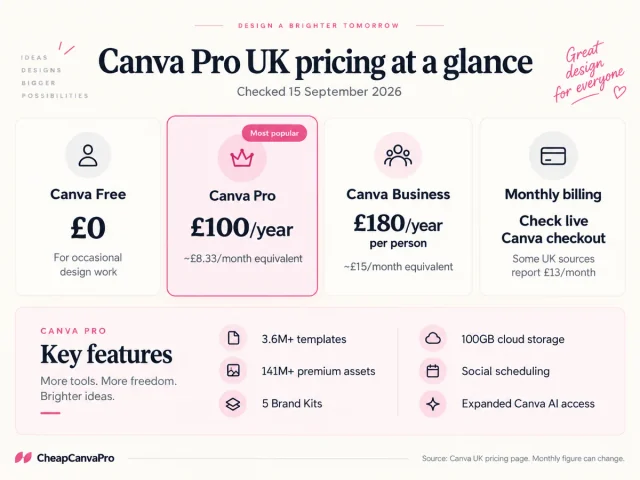
*The £13 monthly figure is reported by Wise's UK Canva pricing guide. Canva's own UK pricing page clearly publishes the £100 annual price but may display monthly pricing dynamically. Check Canva's live checkout before relying on a monthly figure.
How much is Canva Pro per year in the UK?
The official Canva UK pricing page currently shows Canva Pro at £100 per year for one person.
That is the cleanest number to use when comparing Canva Pro prices because it comes directly from Canva.
At £100 a year, the effective monthly cost is:
£100 ÷ 12 = £8.33 per month
The important detail is that you pay the annual amount as an annual subscription rather than literally paying £8.33 every month.
How much is Canva Pro per month in the UK?
Canva offers a monthly billing option, but this is where UK search results become messy.
Some older pages still quote £10.99. Other recent UK guides quote £13 per month. Wise currently reports £13/month, while Canva's official pricing page prominently shows the annual £100 price and a Monthly/Yearly selector.
For that reason, I would not rely on an old screenshot or a random coupon page for the current monthly cost.
The practical rule is simple:
- use £100/year as the published annual price;
- check Canva's live UK pricing page for the exact monthly amount before subscribing.
If the £13/month figure is what you see at checkout, paying monthly for 12 months would total £156, compared with £100 on the annual plan. That is a £56 difference over a full year.
What do you actually get with Canva Pro?
Price only matters if the paid features are useful to you.
According to Canva's current UK pricing page, Canva Pro includes:
- 3.6M+ templates, including premium templates;
- 141M+ premium photos, videos, graphics and audio;
- 5 Brand Kits;
- 100GB of cloud storage;
- social content scheduling;
- AI tools for tasks such as resizing, translating and removing backgrounds;
- access to Canva AI 2.0 and other newer Canva AI features;
- a larger AI allowance than Canva Free;
- access to Affinity with AI features.
For someone creating content every week, the time-saving tools can matter more than the raw number of templates.
For someone making a birthday invitation once every few months, Canva Free may already be enough.
That distinction matters, because paying for Pro only makes sense if you are actually using Pro features.
Canva Free vs Canva Pro: what changes?
Canva Free is more capable than many people assume.
Canva currently lists Free with:
- 1.6M+ templates;
- 4.7M+ photos, videos, graphics and audio;
- 1 Brand Kit with limited colours;
- 5GB cloud storage;
- a smaller AI allowance;
- access to the core Canva editor.
Pro increases the premium library substantially and adds tools that are designed to reduce repetitive work.
| Feature | Canva Free | Canva Pro |
|---|---|---|
| Price | £0 | £100/year |
| Templates | 1.6M+ | 3.6M+ |
| Photos, video, graphics & audio | 4.7M+ | 141M+ premium assets |
| Brand Kits | 1 limited kit | 5 Brand Kits |
| Cloud storage | 5GB | 100GB |
| Social scheduling | No | Yes |
| Premium AI allowance | Lower | Higher |
| Background removal / advanced tools | Limited | Expanded access |
If you are mostly using free templates and basic exports, upgrading simply because “Pro sounds better” is probably unnecessary.
If you regularly remove backgrounds, resize designs for several platforms, manage a brand, schedule social content or use premium assets, the upgrade becomes easier to justify.
For a deeper feature-by-feature comparison, see Canva Free vs Pro UK.
Is Canva Pro cheaper annually than monthly?
Usually, yes.
Canva's UK pricing page currently promotes annual billing with a saving versus monthly billing. The official annual price is £100.
Using the £13/month figure currently reported by Wise:
- 12 monthly payments: £156
- annual Canva Pro: £100
- difference: £56
That does not automatically mean annual billing is better for everyone.
If you only need Pro for one or two months, paying a higher monthly rate can still cost less overall than buying a full year you will not use.
The useful question is not:
“Which option has the lowest monthly equivalent?”
It is:
“How long am I realistically going to use Canva Pro?”
Which Canva Pro term makes sense for you?
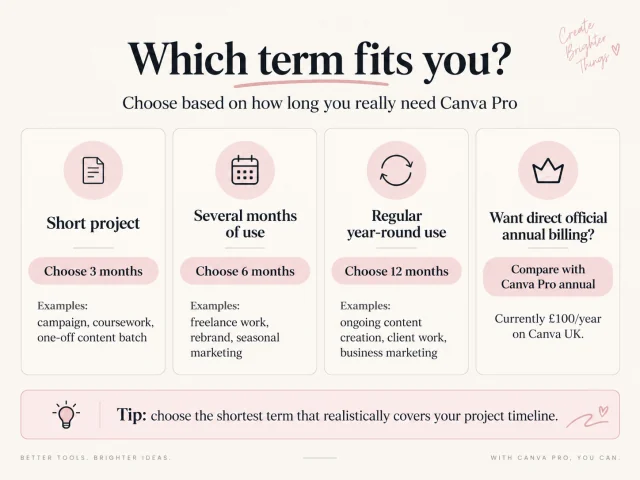
Here is a more practical way to think about it.
You only need Pro for a short project
A monthly option or a short fixed term can make more sense.
Examples:
- a three-month social media campaign;
- a university project;
- a temporary freelance contract;
- rebranding a small business;
- creating a batch of marketing assets.
CheapCanvaPro's current 3-month option is £9.
You expect to use Canva for several months
If you are not ready to commit to a full year but know you will use premium features regularly, a medium-term option can be easier to budget.
CheapCanvaPro currently lists 6 months at £15.
Canva is part of your normal workflow
If you create content throughout the year, annual pricing is the comparison that matters most.
Canva currently lists Pro at £100/year.
CheapCanvaPro lists a 12-month fixed term at £19.
CheapCanvaPro lists fixed-term access for 3, 6 and 12 months. When comparing options, look at the total term, support, access conditions and price.
Official Canva Pro vs CheapCanvaPro: what is the actual difference?
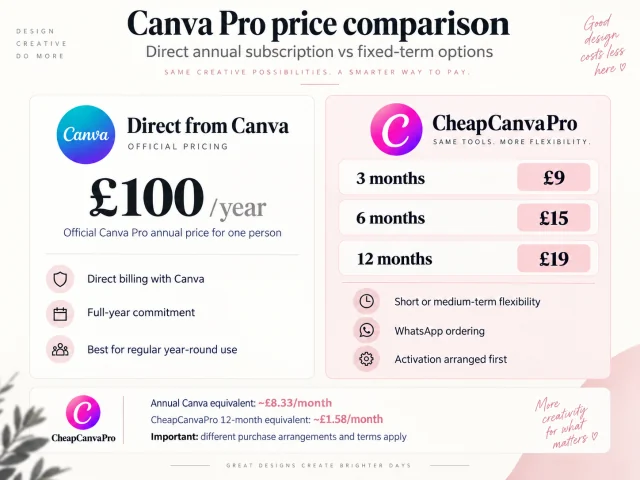
The headline numbers are easy to compare, but they do not tell the whole story.
Buying directly from Canva
You are purchasing your subscription directly from Canva under Canva's billing and account terms.
That is the simplest route if you prefer Canva’s standard annual billing and do not mind the official price.
Using CheapCanvaPro
CheapCanvaPro offers fixed-term access with clearly stated plan durations.
The current process is:
- choose a 3, 6 or 12 month term;
- enter the email linked to your Canva account;
- send the prepared request through WhatsApp;
- activation is handled first;
- payment is arranged afterwards.
CheapCanvaPro does not ask for your Canva password through the website.
If you are comparing the two, do not treat £100 vs £19 as though the buying process is identical. It is more accurate to compare them as two different ways of arranging Canva Pro access.
Is Canva Pro worth £100 a year?
There is no honest universal answer.
For some people, yes. For others, absolutely not.
Pro is easier to justify if you:
- create social content every week;
- regularly need premium stock assets;
- use Background Remover;
- manage brand colours, fonts and logos;
- resize the same design for several platforms;
- schedule social posts from Canva;
- use Canva AI tools frequently;
- create client work or business marketing materials.
Free may be enough if you:
- design only occasionally;
- mostly use free templates and assets;
- do not need Brand Kits;
- do not use AI tools much;
- do not need scheduling;
- can work comfortably within 5GB of storage.
The best way to decide is to look at what you actually created in Canva over the last month.
If none of your real work required Pro features, the upgrade is difficult to justify.
If you repeatedly hit the same Free limitations, Pro has a clearer value.
What about Canva Business?
Canva Business is a different plan aimed at people who need more business and team functionality.
Canva currently lists Business at £180 per year per person.
It includes higher limits and additional features such as more Brand Kits, team administration and business-focused controls.
If you are a solo creator, freelancer or one-person business, Canva Pro is usually the more relevant comparison.
If multiple people need their own managed access, Business becomes more relevant.
Does Canva Pro have a free trial?
Yes. Canva currently promotes a Canva Pro free trial on its official Pro and pricing pages.
Trial availability and conditions can change, so check the live offer shown on your Canva account before assuming a particular trial length.
A trial is useful if you are unsure whether Pro features will actually improve your workflow.
Instead of testing every feature, try the three things you already do most often.
For example:
- remove backgrounds from three real images;
- resize one campaign into several formats;
- build your actual Brand Kit.
That will tell you more than browsing the premium template library for an hour.
Why do different websites show different Canva Pro prices?
Because pricing articles age badly.
Canva changes plans, features and regional pricing over time. Some pages ranking in Google still mention old template counts, old AI credit systems, Canva Teams pricing that no longer matches the current Business plan, or older UK subscription prices.
That is why this guide uses Canva's live UK pricing page for current pricing.
Where a third-party figure is used, such as the reported £13 monthly price, it is clearly identified rather than presented as if Canva published it directly.
If you are reading this months after the update date, check Canva before making a decision.
The bottom line
For UK users, the most reliable current figure is:
Canva Pro: £100 per year for one person.
That works out to about £8.33/month over a year.
Monthly billing is also available; Wise currently reports £13/month, but check the live Canva UK price before subscribing because monthly pricing can change.
CheapCanvaPro currently offers:
- 3 months — £9
- 6 months — £15
- 12 months — £19
If you use Canva occasionally, start by asking whether Free already does enough.
If you use premium assets, Brand Kits, Background Remover, social scheduling or Canva AI regularly, Pro is much easier to justify.
And if price is the main reason you are hesitating, compare the length you actually need rather than automatically buying the longest subscription.
Frequently asked questions
Canva's official UK pricing page currently lists Canva Pro at £100 per year for one person.
Canva offers monthly billing. Wise currently reports the UK monthly price at £13/month. Check Canva's live UK pricing page before buying because monthly pricing can change.
Yes. £100/year is the price currently displayed for one person on Canva's official UK pricing page.
At current published figures, annual billing is cheaper over a full year than paying the reported £13 monthly rate for 12 months.
For occasional design work, it can be. Canva Free currently includes 1.6M+ templates, 4.7M+ media assets, 5GB storage and the core editor. Pro becomes more useful when you need premium assets, more Brand Kits, more storage, social scheduling and advanced/AI tools.
Yes. Canva's current Pro plan includes Canva AI features and a larger AI allowance than the Free plan.
Some students may receive premium Canva access through eligible education programmes or their institution. See Canva Pro for Students UK for the eligibility details.
The current entry option is £9 for 3 months.
References
Canva UK pricing
Canva UK pricingCanva Pro official page
Canva Pro official pageWise UK Canva pricing guide
Wise UK Canva pricing guide
Want a lower-cost fixed term?
Compare the current 3, 6 and 12 month options and choose the term that fits how long you expect to use Canva Pro.