
Canva Free is genuinely enough for many people. It currently includes 1.6M+ templates, 4.7M+ media assets, 5GB of storage and limited AI access. Canva Pro costs £100/year for one person in the UK and adds 3.6M+ templates, 141M+ premium assets, 5 Brand Kits, 100GB storage, social scheduling and much higher AI allowances.
The useful question is not simply whether Pro has more features. Of course it does. The useful question is whether the paid features remove enough friction from the work you already do to justify paying for them. That is the point of this guide.
Canva Free vs Pro UK: the main differences
Here is the current UK comparison based on Canva's published plan details.
| Feature | Canva Free | Canva Pro |
|---|---|---|
| Price | £0 | £100/year for one person |
| Templates | 1.6M+ | 3.6M+ including premium |
| Photos, videos, graphics & audio | 4.7M+ | 141M+ premium assets |
| Brand Kits | 1 limited kit, 3 colours | 5 Brand Kits |
| Cloud storage | 5GB | 100GB |
| Social scheduling | Not included | Included |
| AI access | Up to 20 Standard or Premium AI uses | Up to 200 Premium AI uses or up to 20 Ultra AI uses |
| Best for | Occasional or simple design work | Regular creators and solo professionals |
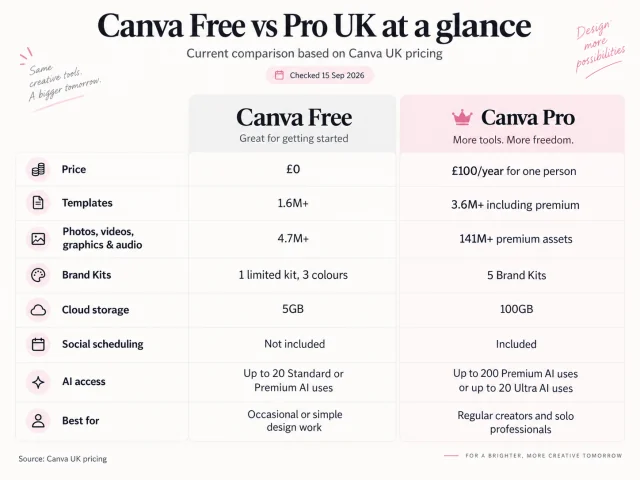
Those numbers make Pro look like the obvious winner, but feature counts are not the same thing as value. If you never use premium stock, do not manage a brand, rarely resize designs and only open Canva a few times a month, Free may still be the smarter choice.
Canva Free is better than many people assume
Canva Free is not just a teaser plan. You can use it for social media graphics, presentations, flyers, PDFs, CVs, invitations, simple website graphics and YouTube thumbnails. If you are learning the tool, working on personal projects or only designing occasionally, the editor itself is already capable enough to produce polished output.
That matters because many Free-versus-Pro articles begin from the assumption that the reader should upgrade. That is not a helpful way to compare products. A better starting point is simple: what is actually slowing you down in Canva today? If the answer is “nothing important”, there is no urgent reason to pay.
What you get with Canva Free in 2026
According to Canva's current UK pricing page, Free includes an easy drag-and-drop editor, 1,000+ design types, 1.6M+ templates, 4.7M+ photos, videos, graphics and audio, 1 Brand Kit limited to 3 colours, 5GB of cloud storage, Canva Offline, Affinity access and limited AI functionality.
Canva currently says the Free plan can provide up to 20 Standard or Premium AI uses, depending on the tools used and the complexity of the task. That makes Free much more usable than many people expect, especially at the beginning.
What Canva Pro adds
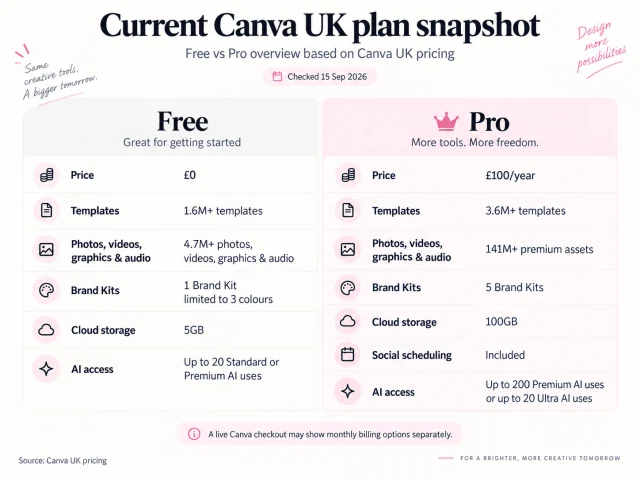
Canva Pro currently costs £100 per year for one person in the UK. The paid plan is less about “unlocking Canva” and more about removing repeated friction from a real workflow. Canva says Pro includes 3.6M+ templates, 141M+ premium assets, 5 Brand Kits, 100GB of storage, social content scheduling, more advanced tools around resizing, translation and background removal, plus higher AI allowances.
1. Premium assets
The jump from 4.7M+ assets on Free to 141M+ premium assets on Pro is huge. But the real benefit is not “having more stuff”. It is spending less time searching for a usable template, photo, graphic or video when you need one quickly.
2. Brand Kits
Canva Free currently gives you one limited Brand Kit with three colours. Pro gives you 5 Brand Kits. That becomes useful if you manage more than one brand, produce client work or want logos, fonts and colours ready every time you open the editor.
3. Background removal and resizing
These are small features until you create content regularly. If you keep turning one design into several sizes, or keep using another tool to remove backgrounds from product images, Pro may save more time than you expect.
4. Storage and scheduling
Free includes 5GB of cloud storage. Pro includes 100GB and also adds social scheduling. For casual users, that may not matter much. For creators or businesses producing content every week, it often matters more.
5. Canva AI
This is one of the biggest practical differences in 2026. Canva currently states that Free can provide up to 20 Standard or Premium AI uses, while Pro can provide up to 200 Premium AI uses or up to 20 Ultra AI uses. If AI is one of the main reasons you are considering Pro, this is one of the clearest areas where the paid plan can be easier to justify.
The 5-minute upgrade test
Instead of reading another endless feature list, look at the last ten things you created in Canva and ask these five questions.
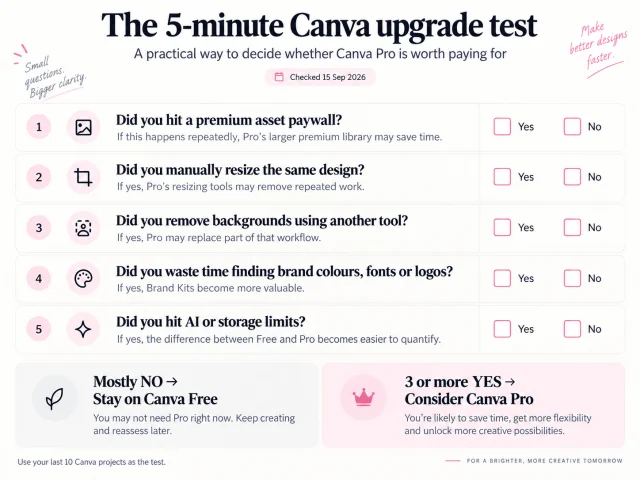
1. Did you hit a premium asset paywall?
If that happens repeatedly, Pro's larger premium library may save you time and frustration.
2. Did you manually resize the same design?
If yes, paid resizing tools may remove repeated work.
3. Did you remove backgrounds using another tool?
If yes, Pro may replace part of that workflow.
4. Did you waste time finding brand colours, fonts or logos?
If yes, Brand Kits become more valuable.
5. Did you hit AI or storage limits?
If yes, the difference between Free and Pro becomes easier to quantify.
If you answer no to nearly all five, stay on Free. If you answer yes to three or more, Pro is probably worth testing.
Who should stay on Canva Free?
- Occasional users: if you create only a few designs a month, Free is likely enough.
- Beginners: if you are still learning the editor, there is little reason to rush into Pro.
- Personal projects: invitations, simple presentations and hobby designs often fit comfortably inside the Free plan.
- People who already use specialist tools: if another tool already handles background removal, scheduling or brand workflows, Pro may create overlap rather than value.
Who is Canva Pro best for?
- Regular creators: if Canva is open several times a week, small time savings start to compound.
- Freelancers: Brand Kits, premium assets and faster resizing are more useful when you repeatedly create client content. See Canva Pro for Freelancers.
- Small business owners: if Canva is part of your weekly marketing workflow, the paid tools can remove repeated production work. See Canva Pro for UK Small Businesses.
- People using Canva AI regularly: if you keep hitting Free AI limits, Pro's higher allowances are one of the clearest reasons to upgrade.
Is Canva Pro worth £100 a year?
For the right user, yes. For everyone, no.
Canva Pro currently costs £100/year in the UK, which works out at roughly £8.33 per month over a year. The easiest way to judge value is to compare the price against time saved. If Pro repeatedly saves you time on resizing, asset searching, background removal or brand organisation, the annual cost can become easy to justify. If those tasks do not exist in your workflow, the upgrade is much harder to justify honestly.
For the latest direct price breakdown, see Canva Pro Price UK 2026.
Common mistakes when comparing Canva Free and Pro
- “Pro has more features, so it is automatically better value.” No. A feature has no value if you never use it.
- “Free is only for beginners.” Also wrong. Many experienced users can stay on Free if their workflow does not depend on premium tools.
- “I need Pro to make professional-looking designs.” No. Design quality still depends on judgement, layout, type and content.
- “Every AI tool is unlimited on Pro.” No. Canva uses plan-based AI allowances.
- “If I use Canva for business, I need Canva Business.” Not necessarily. Pro is often the relevant paid step for solo creators and solo businesses.
Our honest conclusion
Stay on Canva Free if you use Canva occasionally, free templates and assets are enough, one limited Brand Kit is enough, 5GB storage is not a problem and you rarely hit AI limits.
Consider Canva Pro if Canva is part of your weekly workflow, you frequently hit premium asset restrictions, you need several Brand Kits, you regularly remove backgrounds or resize content, you want built-in social scheduling, or you use Canva AI enough to hit the Free allowance.
That is the honest difference. Pro is not valuable because a comparison chart has more checkmarks. It is valuable when those checkmarks remove problems you already have.
Frequently asked questions
Yes. Canva currently offers a Free plan at £0 for individual users.
Canva currently lists Canva Pro at £100 per year for one person on its UK pricing page.
For most regular users, the biggest differences are the much larger premium asset library, more Brand Kits, 100GB storage, social scheduling, paid editing tools and substantially higher AI access.
Usually not immediately. Beginners can learn the editor and create real projects on Free first. Upgrade when a specific limitation starts costing you time.
It can be, especially if the business creates content regularly. Brand Kits, premium assets, resizing, background tools and scheduling are more valuable when they remove repeated weekly work.
Often, if Canva is part of paid client work. The key question is whether Pro saves enough production time or improves consistency across client projects.
Yes. Canva Free includes limited AI access. Canva currently says Free can provide up to 20 Standard or Premium AI uses depending on the tools and task complexity.
Canva lists background removal among the AI and design tools available with Pro.
Canva Pro is sold for one person, but that user can access their account across supported devices. It is not the same as buying seats for multiple people.
It is more capable for teams and business workflows, but that does not automatically make it better value for a solo user. Pro is usually the relevant comparison for an individual buyer.
Compare Canva Pro plans
If you've decided Canva Free is no longer enough, compare the current CheapCanvaPro terms before choosing the length that fits your workflow.