
Canva Pro is not automatically free for every UK student. Eligible primary and secondary students can receive premium Canva features through Canva Education when their teacher or eligible school gives them access. University and college students may receive premium access through Canva Campus, but only when their institution provides it. A university email by itself does not automatically unlock Canva Pro, and Canva does not currently advertise a normal individual higher-education discount for Pro or Business.
Access depends on your school or university. Check with your institution to confirm what is currently available to you.
Canva student access in the UK at a glance
| Student type | Free premium access? | How it works |
|---|---|---|
| Primary / secondary student | Yes, if eligible | Teacher or school provides Canva Education access |
| Sixth-form / school-age student | Potentially | Depends on whether the institution falls under eligible primary / secondary education |
| University student | Only if university provides it | Premium access comes through Canva Campus |
| College / higher-education student | Only if institution provides it | Campus access is institution-managed |
| University student without Campus | No automatic Pro access | Use Canva Free or compare paid Pro options |
| Student with only a university email | No automatic upgrade | The email can identify you to an existing institution licence, but does not create one |
The most important distinction is simple: school-level Canva Education and university-level Canva Campus are different systems. Many “Canva student discount” pages blur them together, which is why students often assume that any university email automatically unlocks Pro.
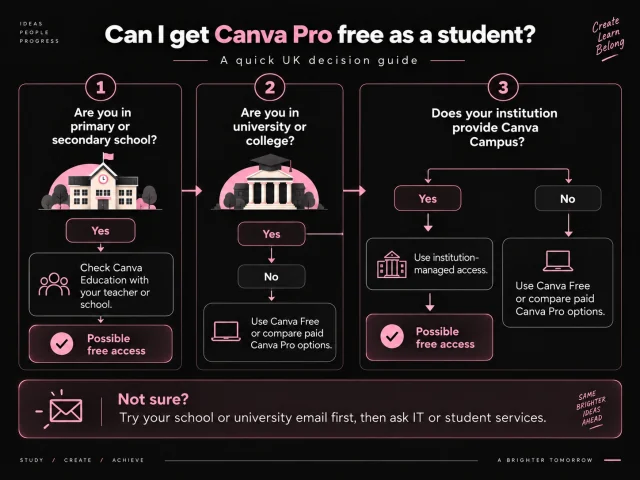
Is Canva Pro free for students in the UK?
Sometimes — but not simply because you are a student.
The answer depends mainly on your level of education and whether your institution participates in the relevant Canva programme. For eligible primary and secondary education, Canva offers Canva Education. For higher education, Canva uses Canva Campus at the institution level.
That means the strongest money-saving step is not searching for a coupon code. It is checking whether your school or university already gives you premium access.
Canva Education: free premium access for school students
Canva Education is designed for eligible primary and secondary education. Canva states that the programme is free for eligible educators, their students and qualifying schools or institutions, and it includes most premium Canva functionality alongside education-focused tools.
How school students get access
Students generally do not independently verify themselves for Canva Education. Access normally comes through an eligible teacher or school.
- Ask your teacher whether your school already uses Canva Education.
- Try your school email if your school has already connected its Canva environment.
- Check your school software or learning portal for an existing Canva login.
- Do not pay for Pro first if the school may already provide the same premium access you need.
For students at school level, that check can be worth more than any temporary discount.
Can university students get Canva Pro free?
Yes, but only when their university or college provides the relevant institutional access.
Canva Campus is Canva's higher-education route. Universities deploy or purchase Campus at the institution level, and eligible students can then receive premium Canva access through the university's managed environment.
This means a university student cannot safely assume:
“I have an .ac.uk address, therefore I automatically get Canva Pro.”
A university email may help identify you as part of a participating institution, but the institution must actually provide the access.
How to check whether your university has Canva Campus
- Try your university email. Sign in to Canva using your university or college email and check whether institutional access is detected.
- Check the university software portal. Look under IT services, digital learning, student software or library/software benefits.
- Ask IT or student services. Higher-education access is managed by the institution, so these teams can confirm whether Campus exists.
- Search the university website. A search such as site:youruniversity.ac.uk Canva can surface an official institutional page.
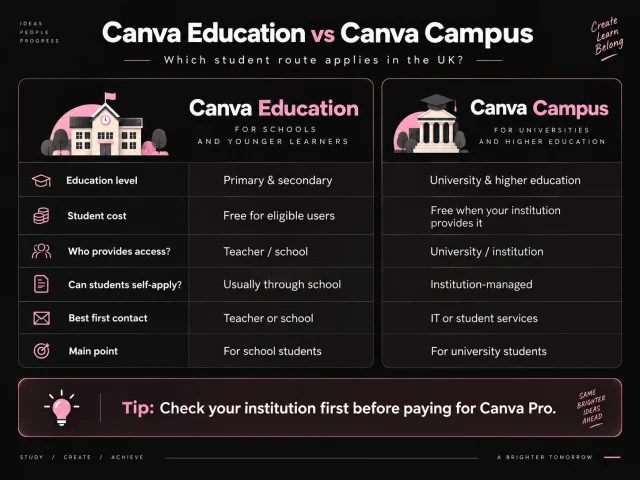
Canva Education vs Canva Campus
| Feature | Canva Education | Canva Campus |
|---|---|---|
| Education level | Primary & secondary | University / higher education |
| Student cost | Free for eligible users | May be free to the student when the institution provides it |
| Who sets it up? | Teacher, school or eligible institution | University / institution |
| Can an individual university student self-apply? | No — this is not the university route | Access is institution-managed |
| Premium features | Most premium Canva features plus education tools | Premium features inside a managed higher-education environment |
| Best first contact | Teacher or school | University IT or student services |
Does a UK university email give you Canva Pro?
No — not automatically.
This is one of the biggest misconceptions around Canva student access. A university email can be the login that connects you to an existing institutional licence, but it does not create a licence by itself.
Think of the university email as the key to an existing university arrangement, not as a discount coupon.
Is there a Canva student discount in the UK?
For an individual higher-education student, Canva currently does not present a normal self-service student discount for Canva Pro or Business.
Instead, higher-education pricing and premium access are organised at the institution level through Canva Campus or other university arrangements.
So the phrase “Canva student discount UK” can hide three completely different situations:
- School student: Canva Education may provide premium access free.
- University student at a participating institution: Campus may provide premium access through the university.
- University student without Campus: the practical options are Canva Free, a trial when available, or a normal paid arrangement.
What if your university does not offer Canva Campus?
You still have sensible options. Start with the one that costs the least and move up only when a real limitation appears.
1. Stay on Canva Free
For many assignments, presentations, CVs, posters, group projects and simple social graphics, Canva Free can already be enough. If you are not repeatedly blocked by a premium limitation, there may be no reason to pay yet.
See Canva Free vs Pro UK 2026 for a deeper feature comparison.
2. Test Canva Pro before committing
If Canva offers your account a free trial, use it to test the premium features against real coursework, portfolio work or freelance projects. Confirm the live trial duration and renewal terms during signup.
3. Pay directly for Canva Pro
If you use Canva heavily all year and prefer direct Canva billing, the normal Pro plan remains the straightforward paid route. For the current UK price breakdown, see Canva Pro Price UK 2026.
4. Compare a clearly defined fixed term
If you only need premium access for a semester or specific project, compare the total cost for the period you actually need. For a fixed-term access option, compare the total period, support, coverage and refund rules as well as price.
For the full savings breakdown, see How to Get Canva Pro Cheaper in the UK.
When is Canva Pro actually useful for a student?
Premium access becomes more valuable when it removes repeated workflow problems rather than simply giving you more features to browse.
- frequent coursework presentations;
- CV and portfolio design;
- student society social media;
- posters and event material;
- video or content projects;
- premium stock assets used repeatedly;
- freelance work alongside your studies;
- regular background removal, resizing or brand-style work.
A student who creates three simple presentations a year may be perfectly comfortable on Free. A marketing student running a society account, building a portfolio and freelancing every week may get much more value from Pro.
The student value test
Before paying, answer these five questions:
- Does your institution already provide Canva? Check this first.
- Can Canva Free already complete your coursework? If yes, paying may be unnecessary.
- Are premium limitations slowing you down every week? Recurring friction matters more than a long feature list.
- Are you using Canva outside university too? Portfolio work, freelance jobs and side projects can make premium access more useful.
- How long do you actually need premium access? One project, one semester and year-round use are different buying decisions.
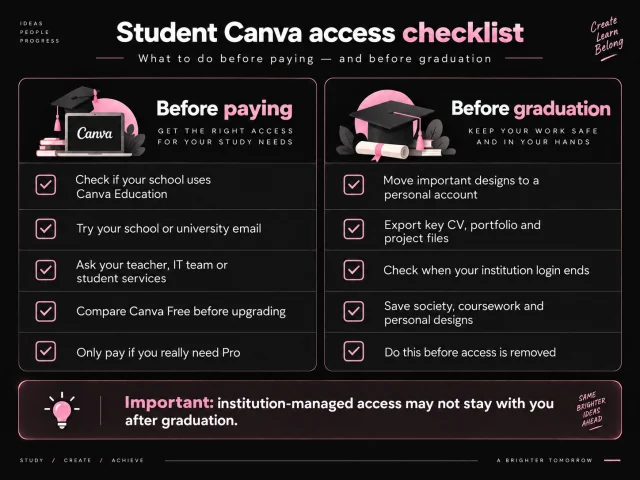
What happens to Canva access when you graduate?
This is one of the most useful details for students to plan for early.
If your premium access comes through a school or university, that access may end when your institutional account is deactivated. Canva advises students leaving Education or Campus environments to make sure important designs are available in a personal account before access disappears.
Before graduation, review:
- portfolio projects;
- CVs;
- coursework you want to keep;
- student-society designs;
- personal projects;
- freelance work stored inside the institution-managed environment.
Do this before your university email or SSO login stops working.
Student Canva deals to be careful with
Students are an obvious target for extremely cheap “Canva Pro” offers. Be cautious when an offer:
- claims any university email automatically unlocks Pro;
- tells university students to pretend they are school teachers;
- asks for your Canva password;
- provides shared login credentials;
- promises “lifetime Canva Pro”;
- does not state a clear access period;
- has no understandable support or refund information.
A useful rule is: your student status should not require you to misrepresent who you are.
Common myths about Canva Pro for students
- “Every student gets Canva Pro free.” No. Access depends on Education eligibility or institution-managed Campus access.
- “An .ac.uk email automatically activates Pro.” No. The university needs an appropriate Canva arrangement.
- “University students should apply for Canva Education.” Canva separates primary/secondary Education from higher-education Campus access.
- “Canva has a normal student discount code.” Canva currently directs higher education toward institutional Campus access rather than a universal individual Pro student discount.
- “If my university has no Campus, I cannot use Canva.” Canva Free remains available and normal paid options remain possible.
Frequently asked questions
Not for every student automatically. Eligible primary and secondary students can receive Canva Education through their teacher or school. University students may receive premium access if their institution provides Canva Campus.
Yes, when their university provides Canva Campus or another relevant managed Canva environment. Students should not assume that every UK university offers it.
No. A university email alone does not automatically activate premium access. It can be used to access an institutional Canva licence when one exists.
Canva currently describes Education as its programme for eligible primary and secondary education. Higher education uses Canva Campus instead.
Canva currently does not advertise a universal individual higher-education discount for Canva Pro or Business. Higher-education premium access is normally institution-based through Campus or another university arrangement.
Try your university email, check the university software or digital-learning portal, and ask IT or student services whether Canva Campus is available.
Yes. Canva Free remains available even when your institution does not provide Canva Campus.
Eligible primary and secondary students can receive Canva Education through a teacher or school, which includes most premium Canva functionality plus education tools.
You may lose institution-managed Education or Campus access when your school account is deactivated. Move or save important work to a personal account before access ends.
No. Check your school or university first because you may already have access through Canva Education or Canva Campus.
Conclusion
For UK students, the key is identifying which education route actually applies to you.
Primary and secondary students should investigate Canva Education. University and college students should investigate Canva Campus through their institution. If your university does not provide Campus, there is currently no universal individual Canva Pro student discount that Canva advertises.
The strongest advice is simple: check your institution before paying.
Need Pro but your institution does not provide it?
Compare the current 3, 6 and 12 month fixed-term options after checking Canva Free, Education and Campus first.