
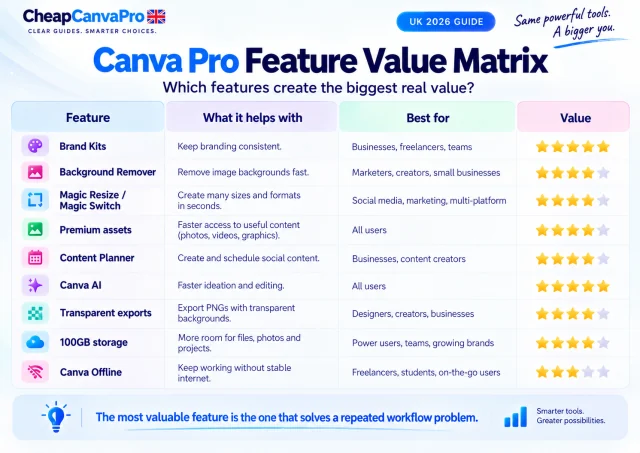
The Canva Pro features most likely to justify paying for the plan are Brand Kits, Background Remover, Magic Resize / Magic Switch, premium assets and Content Planner. They solve recurring production problems rather than simply adding more creative options.
Canva currently lists Pro at £100 per year for one person in the UK, with 5 Brand Kits, 100GB cloud storage, 3.6M+ templates, 141M+ premium media assets and higher AI allowances than Canva Free. The best feature for you is the one that repeatedly removes work from projects you already create.
Canva can change feature limits and product names. Check the current UK pricing and Pro pages for the latest details.
What do you actually get with Canva Pro in the UK?
Canva currently positions Pro primarily for solo creators who want premium design tools, content, branding controls and higher AI usage. Its UK pricing page lists Canva Pro at £100 per year for one person.
The key question is not how many features appear on the pricing page. It is which features solve a repeated problem in your own workflow. A tool used once during a trial has little practical value; a tool that saves ten minutes every week can become meaningful over a year.
| Canva Pro feature | Current UK Pro allowance / access | Why it can matter |
|---|---|---|
| Templates | 3.6M+ | More ready-made starting points |
| Premium media | 141M+ photos, videos, graphics and audio | Less time searching elsewhere |
| Brand Kits | 5 | Repeatable brand consistency |
| Cloud storage | 100GB | More room for uploads and projects |
| Background Remover | Included | Faster product and portrait editing |
| Magic Resize / Magic Switch | Included | Adapt one design to multiple formats |
| Content Planner | Included | Design, schedule and publish in one workflow |
| AI | Higher allowance than Free | More AI-assisted writing, design and editing |
| Transparent exports | Included | Useful for logos, overlays and reusable assets |
Best Canva Pro features by use case
Feature value changes depending on what you create. A freelancer handling client brands has different needs from a student making occasional presentations, while an ecommerce seller may value image editing more than social scheduling.
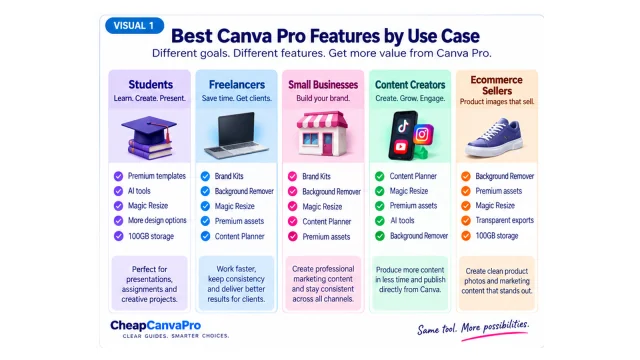
| Main workflow problem | Most relevant Pro feature | Typical use case |
|---|---|---|
| Keeping designs consistent | Brand Kits | Freelancers, businesses, creators |
| Removing image backgrounds | Background Remover | Ecommerce, products, thumbnails, portraits |
| Creating many campaign sizes | Magic Resize / Magic Switch | Social media and marketing |
| Searching repeatedly for stock content | Premium assets | Creators, marketers, businesses |
| Publishing regular social content | Content Planner | Small businesses and social creators |
| Using AI every week | Canva AI / higher AI allowance | High-volume creative workflows |
| Storing many client or video assets | 100GB cloud storage | Heavy users and freelancers |
1. Brand Kits: best for repeated branding
Brand Kit is one of the clearest recurring-use features because it reduces repetitive setup. Canva Free currently includes one limited Brand Kit with three colours, while Canva Pro provides five Brand Kits.
For regular branded work, the value is not that remembering a colour code is difficult. The value is avoiding repeated searching for the correct logo, fonts, colours and visual references across dozens of designs.
A freelancer handling four regular clients can keep commonly used brand settings organised. A small business can make it easier for every weekly social post, flyer and presentation to use the same visual identity. If you rarely reuse a brand, however, this feature matters much less.
2. Background Remover: best for product and portrait workflows
Background Remover is easy to value because the alternative often involves another tool or manual editing. Canva's Pro workflow can remove backgrounds from product photos, headshots and other images directly inside the editor.
Imagine an online seller preparing 20 product graphics. If exporting each photo to another background-removal service adds only two minutes, that is roughly 40 minutes of extra work in one project. Repeated every month, a small feature can become one of the most valuable tools in the plan.
This is especially useful for ecommerce sellers, restaurants, beauty businesses, estate agents, thumbnail creators and freelancers producing promotional graphics.
3. Magic Resize / Magic Switch: best for multi-platform campaigns
One campaign rarely stays in one size. A single creative may need versions for Instagram posts, Stories, Facebook, LinkedIn, Pinterest, email and presentations.
Magic Resize and Magic Switch give you a starting version for other dimensions and formats instead of rebuilding everything from scratch. The result can still need manual adjustment, so this is not a one-click replacement for design judgement. Its value is reducing the amount of repetitive reconstruction.
The more platforms you publish to, the more useful Resize becomes. If almost everything you create uses one fixed format, its contribution to Pro's value is smaller.
4. Premium templates and media: best for reducing search friction
Canva Free already includes a large content library. Canva's current UK plan comparison lists more than 3.6M templates and 141M+ premium photos, videos, graphics and audio assets with Pro.
The practical benefit is not the headline number. Nobody needs 141 million assets. The value appears when the right image, video clip, illustration or template is immediately available instead of forcing you to leave Canva, search another stock site, check licensing, download the asset and upload it again.
If clients already provide all your photography or you subscribe to another stock library, this feature may duplicate something you already have.
5. Content Planner: best for simple social publishing
Canva Pro includes Content Planner for designing, scheduling and publishing social content. Canva also provides performance information such as impressions, clicks, likes and comments for supported published posts.
The advantage is consolidation. A simple workflow can move from design → export → another scheduler → upload → schedule to design → schedule.
This can matter for a small business or creator publishing several times per week. If you already use an advanced social management platform for approvals, inbox management and reporting, Canva's scheduler may duplicate existing functionality and should not be counted as major new value.
6. Canva AI: useful for heavy users, but not automatically the best reason to upgrade
Canva Pro currently provides substantially higher AI usage than Free. Canva's pricing information describes shared AI allowances whose actual consumption varies depending on the feature and task complexity, and additional AI allowance can be purchased separately.
AI tools can help with writing, visual generation, editing, translation, layout transformation and ideation. But AI product limits and capabilities change faster than established workflow tools such as Brand Kits or Resize.
For that reason, AI should be judged by your actual weekly use. If you already rely on Canva AI during client or content work, higher limits matter. If you only experiment with AI occasionally, its presence should not be the main reason you pay £100 per year.
7. Transparent background exports
Transparent PNG exports are useful for logos, product overlays, stickers, watermarks and reusable graphics. This is a relatively small feature, but for people repeatedly preparing brand assets it removes another workaround.
8. 100GB cloud storage
Canva Free currently includes 5GB of cloud storage while Pro includes 100GB. Heavy users can accumulate uploaded photography, video, presentations, client assets and project archives quickly.
Storage should rarely be the sole reason to upgrade, but it becomes more useful when Canva is already a central workspace. One important accuracy point: older third-party articles sometimes quote different storage numbers. Canva's current UK pricing page should take priority over outdated comparisons.
9. Newer Pro capabilities
Canva continues to add capabilities around AI, advanced editing and connected workflows. New features can expand what Pro can do, but new does not automatically mean essential.
The correct test remains simple: does the feature remove a recurring problem from your real work? If you use it once because it is new, its contribution to the subscription is small. If it removes the same ten-minute task every week, its value is much easier to measure.
Which features matter most for freelancers?
For many freelancers, the strongest combination is Brand Kits → Background Remover → Magic Resize → premium assets, with AI and Content Planner depending on the service being sold.
Freelancers should focus on production time. Repeatedly finding logos, resizing campaigns, preparing images and sourcing assets reduces the time available for paid client work. Our Canva Pro for Freelancers UK guide goes deeper into the billable-hour calculation and client workflow.
Which features matter most for small businesses?
For a business producing regular marketing material, the most useful combination is often Brand Kit + Background Remover + Resize + premium assets + Content Planner. Together they cover much of a simple brand → create → adapt → publish workflow.
A business creating content only a few times per year may still receive enough value from Canva Free. See our Canva Pro for UK Small Businesses guide for the time-saving calculation.
Which features matter most for students?
Students should first check whether their school, university or institution already provides suitable Canva access. Someone creating only occasional presentations, posters or CVs may find Free sufficient.
Premium templates, AI, Background Remover and extra storage can be useful for frequent projects, portfolios or societies, but paid Pro should not automatically be treated as necessary for education. Our Canva Pro for Students UK guide explains the access options.
Features that sound useful but may not matter to you
One of the easiest mistakes in software comparisons is treating every included feature as personal value. Three users can receive the same Pro plan and obtain completely different value from it.
- An ecommerce seller may get high value from Background Remover but almost none from social scheduling.
- A presentation designer may care more about templates, Brand Kits and AI than product-image tools.
- An occasional user may not save enough time with any premium feature to justify paying.
Feature count is therefore a weak decision method. Workflow relevance is stronger.
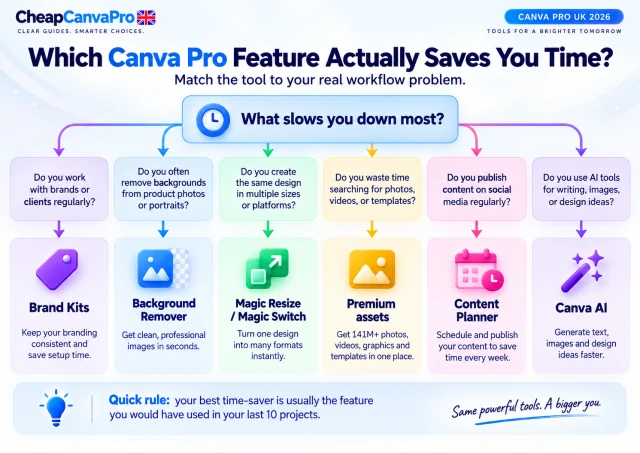
The Last 10 Projects Test
Before upgrading, open your last ten Canva projects and look for repeated friction. Ask:
- Would Brand Kit have saved setup time?
- Did you need to remove an image background?
- Did you recreate the same design in several sizes?
- Did you repeatedly search for a free alternative to a premium asset?
- Did you export content only to schedule it somewhere else?
- Did you repeatedly use AI or need higher limits?
- Did you need transparent graphics?
0–2 of your last 10 projects
Canva Free is probably meeting your current needs well. Paying for Pro simply because it has more tools may not create enough value.
3–5 projects
Pro deserves consideration, particularly if the same limitations recur every month.
6–10 projects
You have evidence of repeated workflow friction. At this point, compare the time those workarounds consume with the £100 annual cost.
Which Canva Pro feature saves the most time?
There is no universal winner. The highest time saving depends on your bottleneck:
- Background Remover when processing many photographs.
- Magic Resize when producing multi-channel campaigns.
- Brand Kits when maintaining repeated branded work.
- Premium assets when stock searching consumes time.
- Content Planner when Canva is already your social-production tool.
- Canva AI when AI-assisted creation is already part of your weekly workflow.
Find the task that repeatedly slows you down. That is usually where Pro has its greatest value.
Is Canva Pro worth £100 for these features?
The best way to answer this is to measure repeated savings rather than count features. Suppose Pro saves you only 15 minutes each week. Across 52 weeks that is about 13 hours per year.
If your time is worth £20 per hour, 13 hours represents £260 of working-time value. That does not mean Pro automatically earns you £260, but it shows why small recurring efficiencies can justify a £100 software cost for frequent users.
If you open Canva only a few times per year, the same calculation looks very different. Canva Pro becomes easiest to justify when premium tools solve recurring rather than occasional problems.
Canva Free or Pro?
Canva Free is already capable. Canva's current UK comparison lists 1.6M+ templates, 4.7M+ media assets, 5GB storage, a limited Brand Kit and some AI access on Free.
Stay on Free when it handles your workflow comfortably. Consider Pro when you can clearly identify repeated limitations. For the full plan comparison, read our Canva Free vs Pro UK 2026 guide. If you already know you want Pro but are deciding how to pay, see Canva Pro monthly vs annual UK.
Frequently asked questions
For many regular creators, the strongest practical features are Brand Kits, Background Remover, Magic Resize / Magic Switch, premium assets and Content Planner. The best feature depends on which task repeats most often in your workflow.
Canva currently lists Canva Pro at £100 per year for one person in the UK. Pricing can change, so check Canva's current UK pricing page before subscribing.
Canva's current UK pricing page lists five Brand Kits with Pro. Free currently includes one limited Brand Kit with three colours.
Yes. Canva Pro includes Background Remover for quickly separating products, people and other subjects from image backgrounds inside the Canva workflow.
Yes. Pro includes Resize / Magic Switch capabilities for adapting designs to different dimensions and transforming content into other formats.
Canva's current UK plan comparison lists 141M+ premium photos, videos, graphics and audio assets with Pro.
Yes. Canva Pro includes Content Planner for designing, scheduling and publishing supported social content, along with selected performance information.
Canva currently lists 100GB cloud storage for Pro, compared with 5GB on Free.
Yes. Pro includes higher AI allowances than Free. Exact usage varies by AI tool and task complexity, and Canva can change limits over time.
No. Pro is easiest to justify when premium features solve recurring problems. If you rarely need Background Remover, Resize, premium assets, branding tools or scheduling, Canva Free may already be enough.
Final decision
The best Canva Pro features are not necessarily the newest or most impressive. They are the ones that remove repeated work. For most regular creators, the clearest practical value is likely to come from Brand Kits for consistency, Background Remover for faster image preparation, Magic Resize for multi-channel content, premium assets for faster creative sourcing and Content Planner for simpler publishing.
Before paying £100 per year, review your last ten projects. If Pro tools would have solved the same problems repeatedly, the upgrade becomes easier to justify. If those problems barely appear, Canva Free may still be the better choice.
Choose Pro based on the features you will actually use
Compare the current fixed-term options after identifying which premium tools solve repeated problems in your workflow.